Solutions

Discover More About Our Printing Solutions

Quick Navigation

Our Printing Solutions

We are proud to offer a nationwide coverage for our supply of photocopier and solutions, providing businesses across the country with access to reliable and efficient document management solutions.
Private Charge Print

Private Charge Print

What is Private Charge Print?

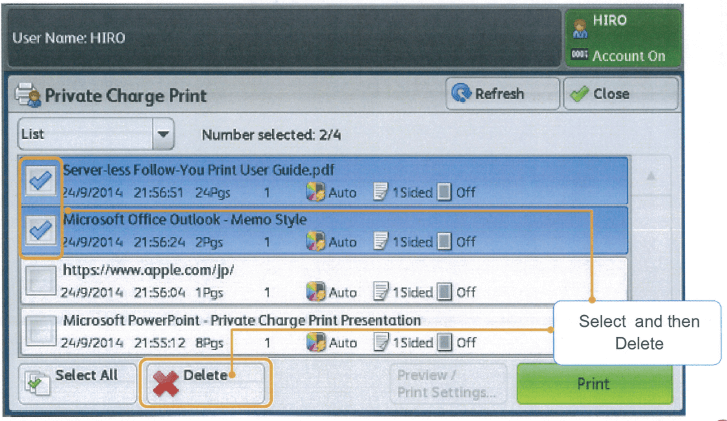
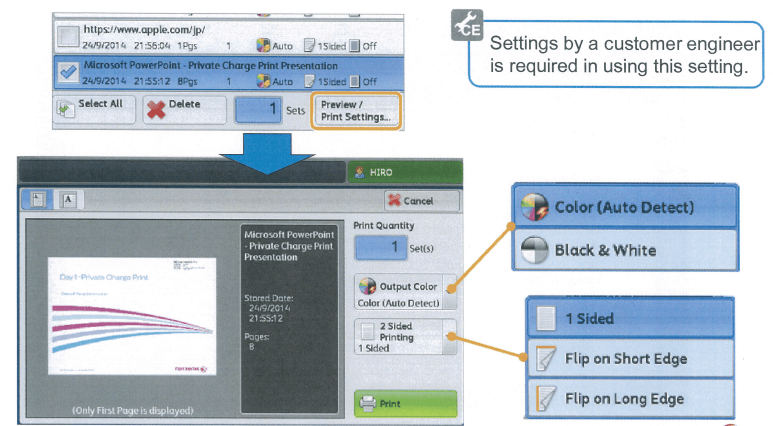
Private Charge Print is a feature available on selected Fuji Xerox Multifunction Devices which can be activated to help companies reduce wastages and cut-costs. This feature requires the user to authenticate themselves before releasing their print jobs sent the device. Users are also able to preview print jobs before releasing them to prevent errors such as an incorrect document being printed or accidentally printing black & white documents as colour documents.

Benefits:

  • Select and Print only necessary jobs, therefore reducing wastages.
  • Displays only the jobs of authenticated users to securely protect the privacy of users.
  • Authenticate and Manage specific users through the system administrator.
  • Received print jobs can be saved for each authentication User ID.
Image
Image

Cloud Solutions

Cloud On-Demand Print

Cloud On-Demand Print

What is Cloud On-Demand Print [CODP]?

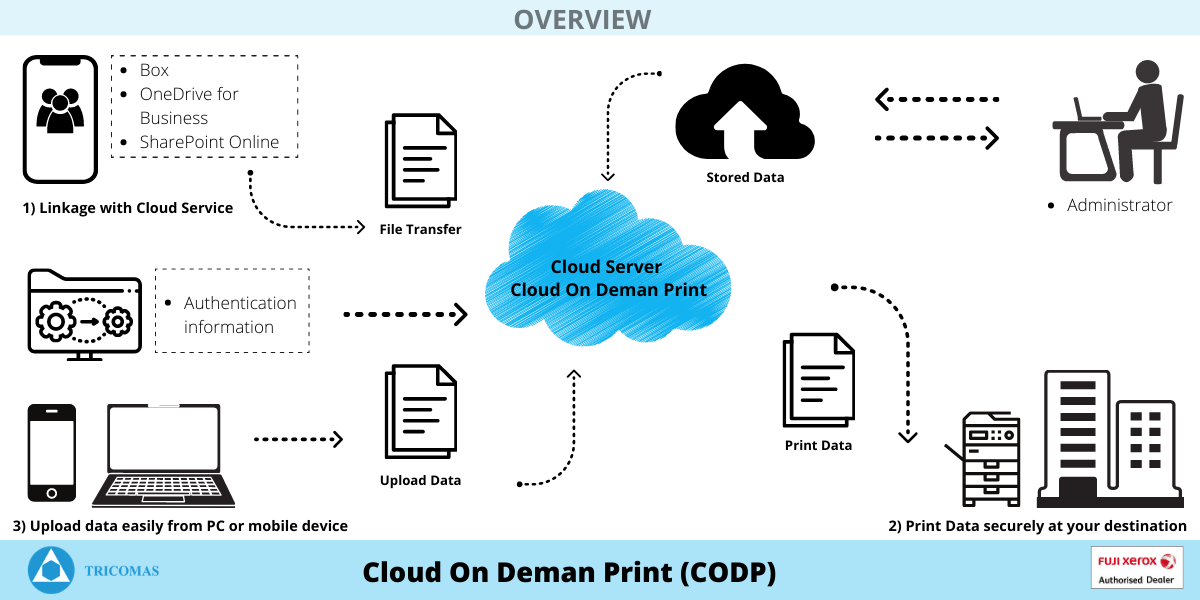
Cloud On-Demand-Print is a Fuji Xerox Cloud-Based Service that enables users to print Jobs to Fuji Xerox Cloud Server via mobile devices & PC. Users can then secure release jobs from any Cloud On-Demand Print supported devices, anytime & anywhere.
 

Main Features/Benefits:

 
Image

1) Upload documents from multiple client terminals

  • Documents can be uploaded from a variety of client terminals such as a web-browser/custom application on a Windows PC.
  • On an IOS or Android Device, upload documents through the Cloud On-Demand Print app available on Google Play Store & Apple App Store.
  • This eliminates the need to install or configure a printer driver.

2) Scalable to your business size, big or small

  • Up to 3,000 multifunction devices can be recognized as Cloud On-Demand Print enabled output devices.
  • Up to 30,000 users at various levels from small groups to departments/offices can be supported.

3) Low implementation and operation costs

  • CODP is a monthly subscription-based Cloud Service.
  • Eliminate the need for an in-house server or a dedicated system administrator.

4) Layered security measures 

  • Access to the cloud server is protected through the use of secure User ID & Password.
  • Uploaded documents will be deleted automatically after a specified period of time regardless if the document is printed out.
  • SSL Encryption for communication during document uploading/printing.
  • Operation history allows you to track and monitor user activities.
  • Documents can be password protected when uploading.
Cloud-Service-Hub

Cloud-Service-Hub

What is Cloud-Service-Hub?

Cloud Service Hub is an integration of multiple cloud systems including Dropbox, Evernote, Google Drive, OneDrive, & Working Folder all with a single sign-on feature from FUJIFILM (formerly Fuji Xerox).

Main Features/Benefits:

Reduce miscommunication and improve efficiency to focus on achieving business growth and maximising profits with FUJIFILM (formerly Fuji Xerox) Cloud Service Hub. This highly scalable software features a single-sign-on feature for effective management of information and easy collaboration between team members.

Image

1) Better collaboration for easy sharing of the latest information within teams in the organization. 

  • The latest content can be conveniently uploaded by scanning it from any FUJIFILM/Fuji Xerox multifunction device in real-time.
  • Up-to-date copies can be stored and shared with team members for easy access.

2) Print directly from mobile devices [IOS & Android] to improve efficiency within the workplace.

  • This software enables users to print directly to any FUJIFILM/Fuji Xerox MFD using their mobile device using the Print Utility app available on the Google Play Store & Apple App Store respectively.
  • Documents can also be accessed through the MFD and printed directly on the device itself.
  • This reduces the need to walk to your PC or Laptop to print important documents during a meeting or an event.

3) Retrieve files without needing to remember where exactly you have stored your files especially if you use multiple cloud storage.

  • Cloud Service Hub supports the world’s most popular cloud services such as FUJIFILM’s “Working Folder“, Dropbox, Evernote, Google Drive, One Drive & SharePoint Online.
  • CSH enables users to access multiple cloud platforms using a single sign-on feature in addition to being able to print & scan to and from these cloud services.
  • Folders can be browsed from these cloud services using a single-search function to locate files stored.

4) Easy conversion of files to improve overall productivity.  

  • A wide variety of files including DocuWorks, Microsft Office, JPEG & TIFF are supported.
  • Before printing, these files are automatically converted to PDF files. This reduces the time needed to convert the documents manually before printing.

5) High-level data security to prevent data leakages and breaches. 

  • High secure data transmission with Cloud Storage protection by an SSL certified, SSL encrypted and data centre security compliance.
Working Folder

Working Folder

What is Working Folder?

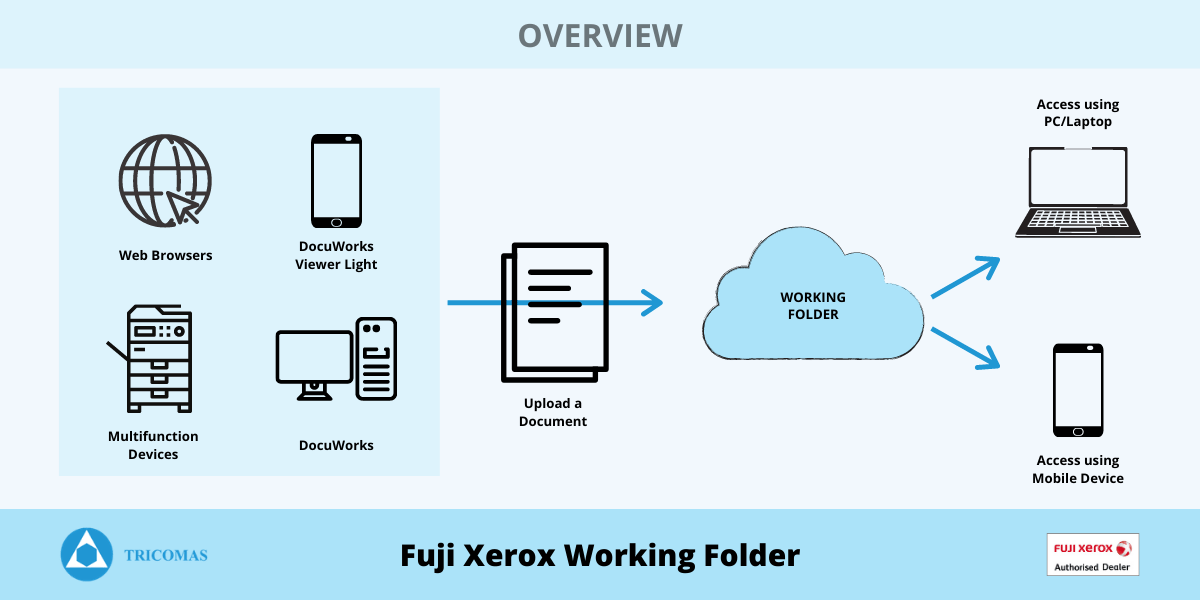
Working Folder is a Fuji Xerox Cloud-Based Storage Service that links to Fuji Xerox multifunction-devices, mobile devices & desktop computers.
Image

Process Flow for Working Folder

Main Features/Benefits:

1) Highly accessible from computers and mobile devices

  • Access Working Folder via the internet from Windows/Apple devices anytime, anywhere.

2) Minimal startup costs, low maintenance fees

  • Sign up with Working Folder Cloud Service for a fixed monthly fee. Enjoy low startup costs and operation fees with no special equipment required such as dedicated servers or Network Attached Storage (NAS).
  • This software does not require a dedicated system administrator.

3) Highly secure and reliable operation

  • Working Folders adopts Amazon Web Services as the service platform based in the Asia Pacific Region.
  • The networks, servers & storage devices utilize redundancy configurations.
  • Customer Data is securely protected through SSL communication and encryption storage.

4) Link with multifunction devices to access incoming faxes and scanned data.    
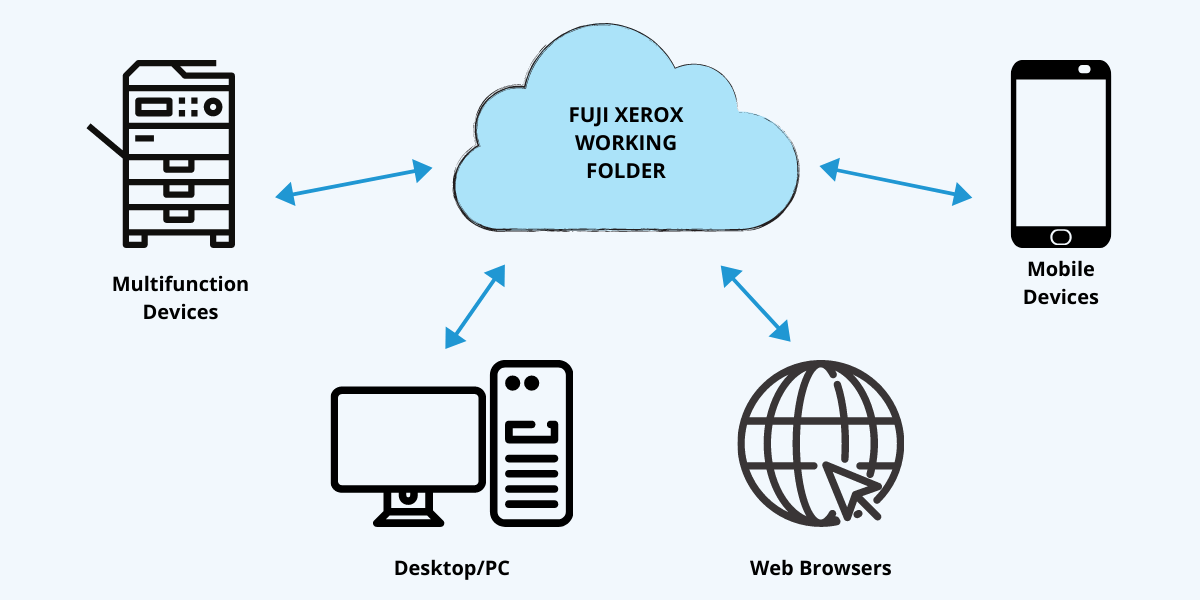
  • Incoming faxes and scanned documents can be configured to automatically be uploaded to the Working Folder using the Job Flow function on the Multifunction Device.
  • The documents can also be printed out directly from the Multifunction devices without the need of a PC.
 
Image

Supported Devices that are able to link to Working Folder

Scanning Solutions

Scan Delivery

Scan Delivery

What is Scan Delivery?

Working Folder is a Fuji Xerox Cloud-Based Storage Service that links to Fuji Xerox multifunction-devices, mobile devices & desktop computers.
Image

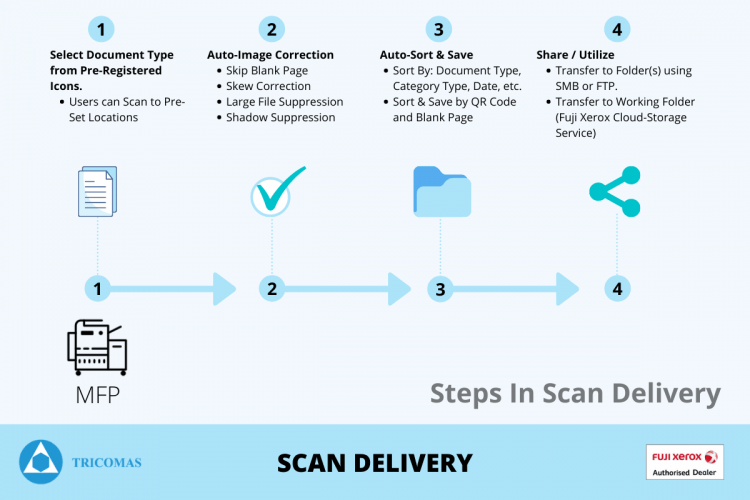
Steps in Scan Delivery:

  1. The Scan Delivery software allows certain operational steps to be configured and pre-set according to the client’s specific requirements.
  2. Scanned images can be automatically corrected through skew correction, skipping blank pages. shadow suppression as well as large-file compression.
  3. Documents can then be automatically sorted and saved according to Document Type, Category Type, Date, User etc.
  4. Files can be transferred to folders in PC/Server using SMB/FTP or even to Working Folder (Fuji Xerox Cloud Service).

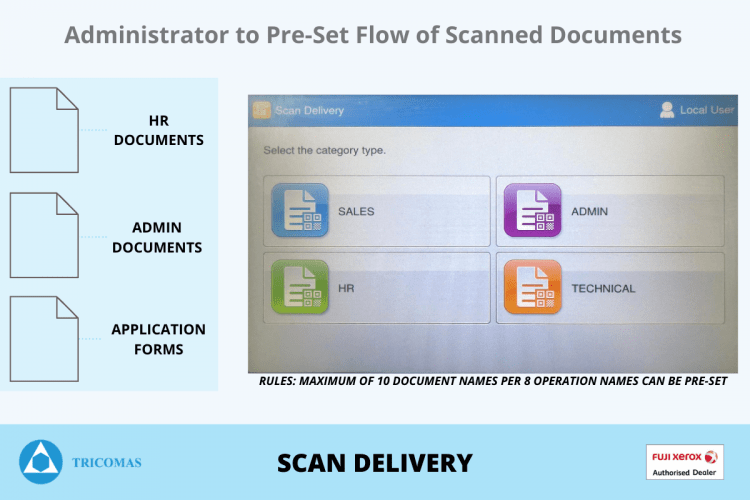
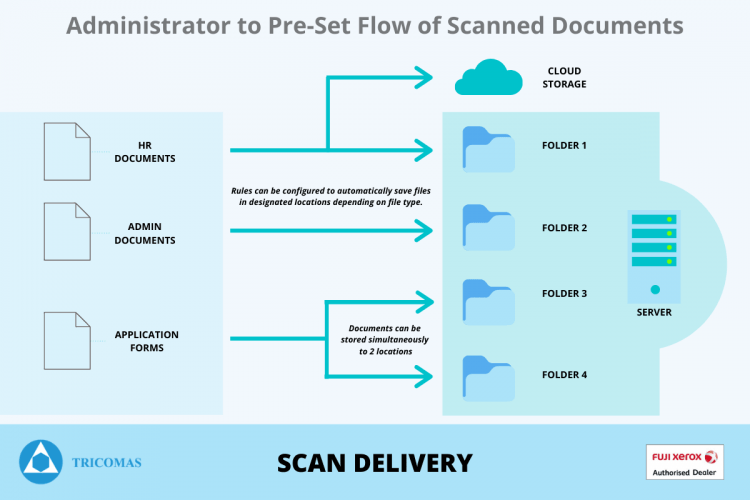
Pre-Set Flow of Scanned Documents

The Administrator can pre-set Scan rules (Maximum 10 documents names per 8 Operation Names).
 
Image

Configuring Rules for Document Saving Location:

Rules can be configured to automatically save files in designated locations depending on the file type. Documents can be stored simultaneously in 2 different locations.
Image

Document Management Software

DocuWorks 9

DocuWorks 9

What is DocuWorks 9?

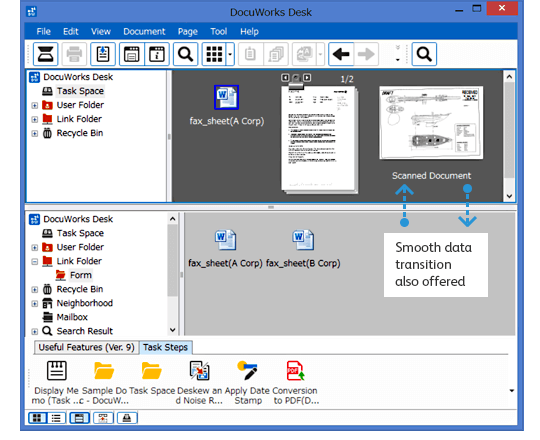
DocuWorks 9 is a Document Handling Software made up of an electronic desk reproduced on your PC (DocuWorks Desk) and a tool for browsing and editing documents arranged on this desk (DocuWorks Viewer). This software is designed to enhance productivity and streamline operations with the goal of enabling anyone to work from anywhere, at any time.
Main Features/Benefits:

  • Edit & Organize documents using tools such as Folder, Binders, Stamp, Stick Note & Keyword Search using the OCR Feature.
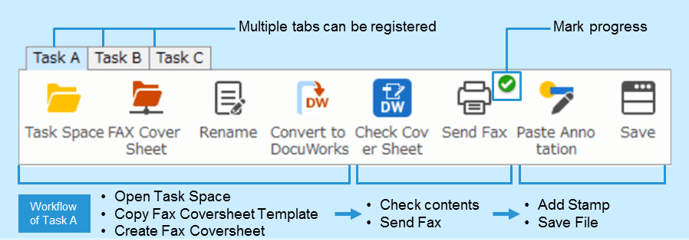
  • Share operating procedures and coordinate with your team using “Task Toolbar”, which allows for customization of multiple tabs.
  • Gather & Process information that you need smoothly with your own portable electronic desk, “Task Space”. Retrieve documents from the Cloud/Internet while being able to continue working on tasks from anywhere.
  • Security functions such as protecting documents with passwords and prohibiting editing/printing are also supported.
  • Mobile Linkage enables you to view and edit DocuWorks documents on IOS or Android mobile devices.
Image

“Work Space”, A Portable Electronic Desk
Image

“Task Toolbar”, Organize & Arrange Functions that you use frequently

Device Management Solutions

Print Audit Overview

Print Audit Overview

Image

Overview

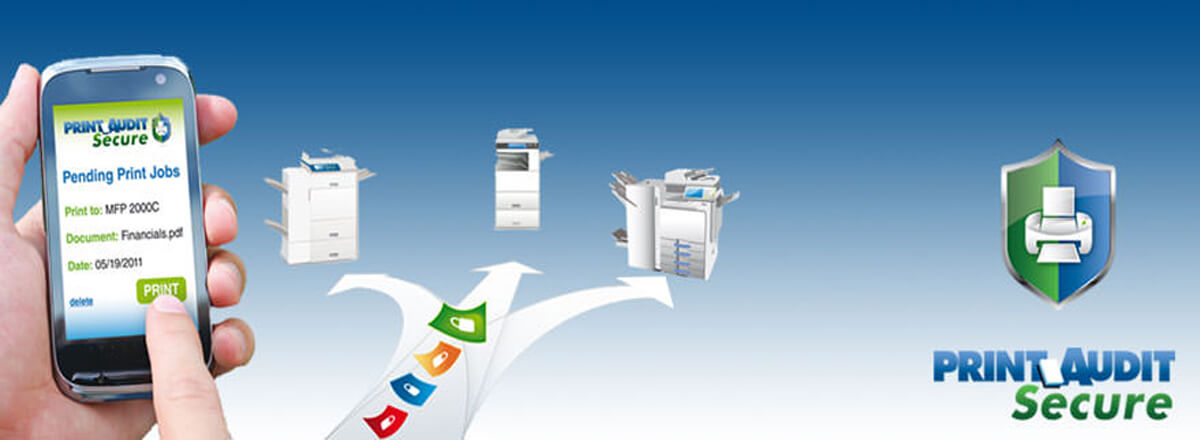
Print Audit Facilities Manager is a software tool designed to securely monitor and optimize your copiers, printers, and MFPs.

Print Audit Facilities Manager Management assures optimal performance and lower downtime therefore increasing the productivity of your workplace.

This software adds value to your product offering while maintaining customer loyalty and boosting profits.

  • Software Installation with NO hardware required.
  • Fully automated software updates.
  • Application runs on a single machine.

Main Features/Benefits:

1) Maximize printer assets
  • Automated reporting of meters, supplies and toner information.
  • Track total cost of ownership and pinpoint costly devices for replacement.
  • Improve employee productivity by ensuring devices run efficiently.
2) Learn more about your printing fleet
  • Automatically track volumes on any new printing devices.
  • Inventory all copies, printers, and multifunction devices.
  • Create reports to identify machine inefficiencies.

3) Simplify supplies & service management
  • Automatically order toner and supplies.
  • Access data from anywhere using the World Wide Web.
  • Lower downtime with internal service and status alerts.
Image
Print Audit Security

Print Audit Security

Image

Scanning

  • SNMP scanning is carried out solely within the internal network, via the standard SNMP port (UDP port 161).
  • The Information Collection Engine (ICE) utilizes unicast transmission to communicate to each IP address within the configured scan range. Broadcast packets are NOT sent.
  • If required, a community string can be specified within the ICE configuration.​​​

Data Collection

  • Print Audit’s server is located in a physically secure environment.
  • Print Audit’s server is protected by a dedicated hardware firewall than prevents all external access, except that which is needed for Facilities Manager to operate.
  • No security threat from external sources as only Facilities Manager is authorized to run on the server.
  • The server is kept up to date with the latest security patches, system patches, and anti-virus updates.
  • Server administration logins are restricted to a limited number of authorized personnel for routine maintenance procedures.

Data Storage

No user or personal data is collected using the ICE. Only the following information is obtained and transmitted to Print Audit’s secure server:

  • Printer name, make and model
  • Serial Number
  • Location
  • IP Address
  • MAC Address
  • Toner Levels
  • Page Counts
  • Status/Alerts (e.g. paper jam)

Data Transmission

  • The ICE connects to Print Audit’s server via an outbound connection only. No reverse connection is made from Print Audit’s server to the ICE.
  • HTTPS is the default send method in the ICE configuration window. This ensures the encryption of data during transmission using standard internet security protocols i.e. 128 bit SSL on TCP port 443. If HTTPS is unavailable, the ICE will utilize HTTP port 80 as the send method.
  • HTTPS (128-bit SSL) is the same security in use by Internet banking and Online Vendors.
  • The server delivers an acknowledgment that the data was received, however, no other data is sent back to the ICE during/after transmission.

Web Interface

All external access is through secure login (username and password) which can be restricted to single/multiple users. Advanced privileges can also be assigned to users.

Image

Mobile Software & Solutions

Print Utility V3

Print Utility V3

What is Print Utility?

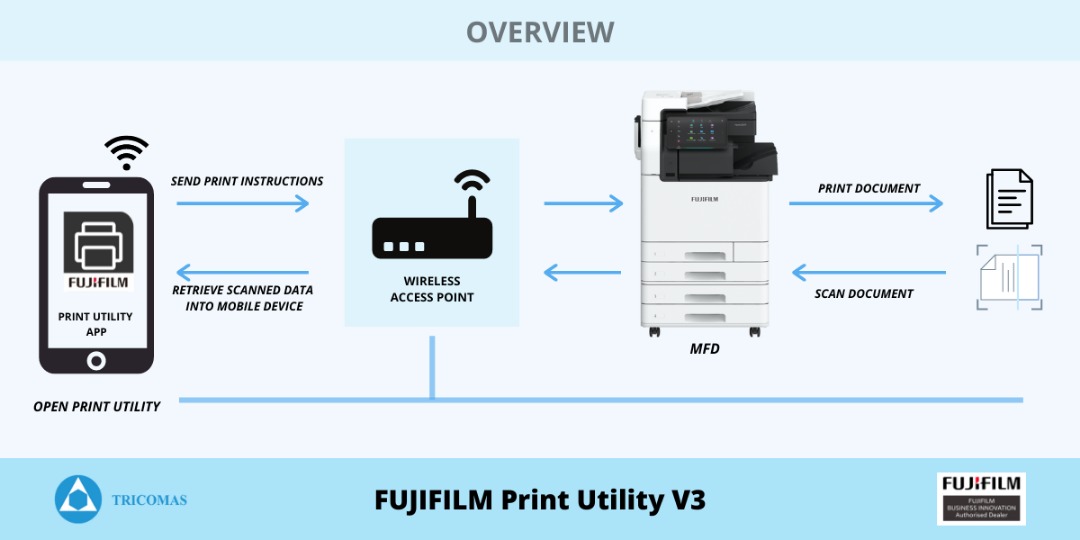
Print Utility V3 is a free printing and scanning application from FUJIFILM (Previously Fuji Xerox) available on both IOS & Android devices. The app includes features designed to improve your work effectiveness by using mobile devices in conjunction with FUJIFILM/Fuji Xerox’s MFPs, printers and software.
Image

Features/Highlights:

MFDs or printers can automatically recognize compatible IOS/Android Devices connected to the office Wireless LAN. The App enables users to print out web pages, images, photographs, DocuWorks documents or PDF documents in collaboration with applications, such as DocuWorks Viewer Light [Available on the App Store]. Users can also send scanned data of a paper document directly to their Mobile Devices.
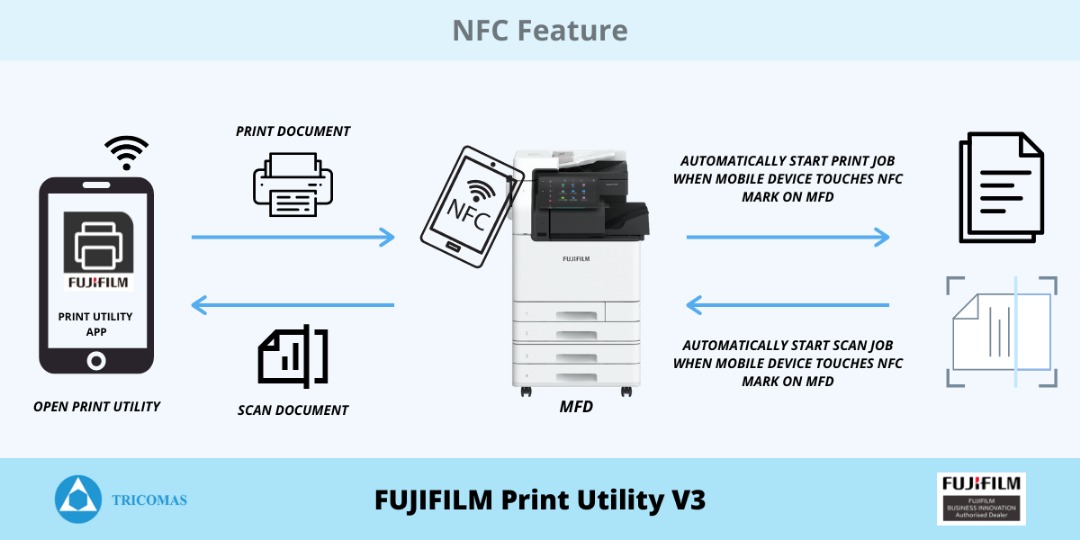
Linkage with Near Field Communication (NFC) :
  • Users can automatically start printing or scanning by touching your iOS/Android device the NFC*1 tag (icon mark) of the control panel with Print Utility. This can help save time when having to line up at the Multi-function Device (MFD) as users.
Image
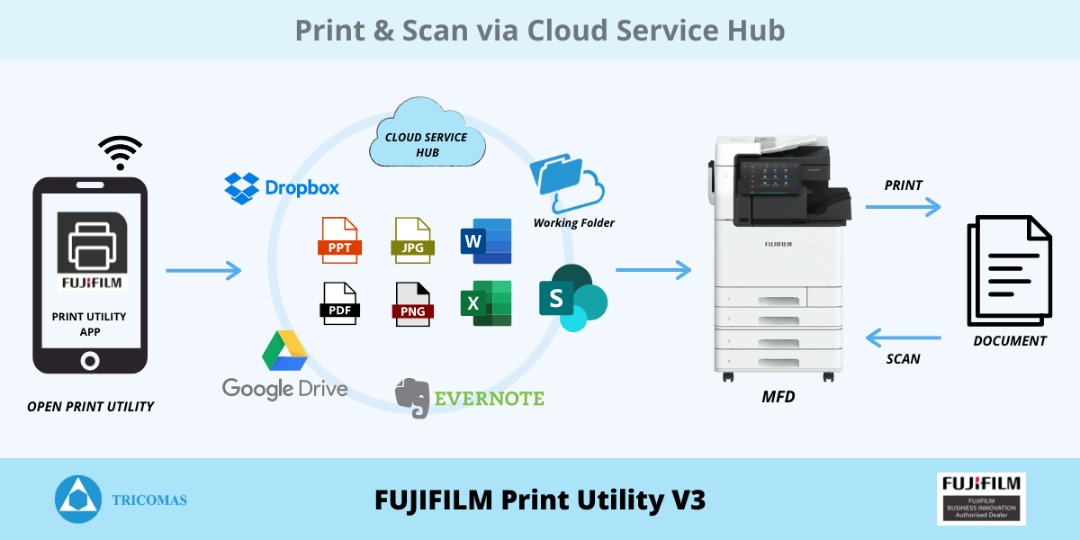
Print & Scan via Cloud Service Hub :
  • Integrate with FUJIFILM’s cloud solution “Cloud Service Hub” to be able to access various file formats such as PDF, Word, Excel, PNG, JPG & PowerPoint stored in your preferred Cloud Storages including FUJIFILM’S Working Folder, Google Drive, SharePoint, One Drive, etc.
  • These documents can be printed directly from the MFD using the single sign-on feature. The documents can also be scanned and stored directly to your preferred cloud storage from the MFD without the need of a PC or Laptop.
Image
Reach Us Today

Looking For The Best Photocopier Solutions In Kuching?

With a wide range of high-quality photocopiers and unparalleled customer service, we're here to help you find the perfect solution for your needs. Contact us today to learn more and take the first step towards upgrading your office.
Image

Contact Info

265, Jalan Datuk Wee Kheng Chiang, 93450, Kuching, Sarawak, Kuching, Malaysia.
Copyright © 2026 Ample Marketing & Services Company Sdn Bhd (503057-M) Project by Dreamztech Web Design.

Register Form

Cancel

Sign in to your account

Register Form

Cancel

Sign in to your account